When working with our IR units it is often useful to test IR codes directly through iTest. To test IR codes through iTest perform the following steps with iTest open:
- Enter the unit's IP address in the IP Address field.
- Select the "Command (4998)" radio button.
- Click "Connect".
- Paste the IR code to be tested in the "Command String" field.
- Click "Send".
After sending an IR code if it is successful a 'completeir,...' response should be seen in the ASCII Response field. If the IR code is being sent to one of our visible emitters the emitter should also briefly blink red. Units with LEDs above the IR ports will also briefly blink the LED above the IR port. On the Flex the LED nearest the 3.5mm jack will blink.
The example animation below shows an IR code being sent to IR port 1. For more about how to address IR codes to particular ports on your unit please see the following FAQ:
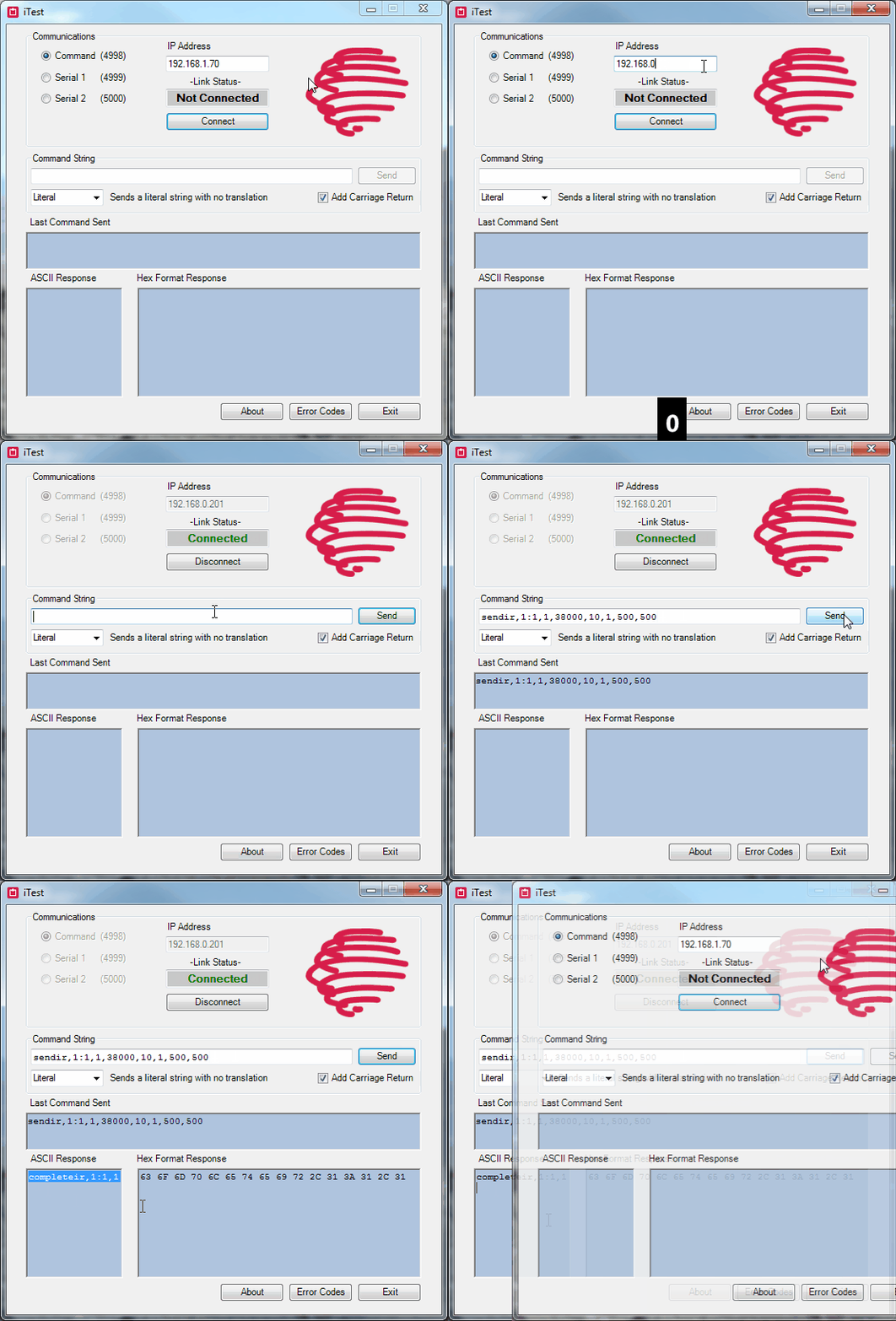
Test codes:
These codes will light up the IR transmission indicator (above the IR output on most models) of the first IR port as well as the IR emitter (assuming a visible IR emitter is being used). The codes will not control any AV device and are for example/testing purposes only.
GC-100-06:
sendir,2:1,1,38000,10,1,500,500
GC-100-12/18/18R:
sendir,4:1,1,38000,10,1,500,500
iTach IP2IR and iTach Flex:
sendir,1:1,1,38000,10,1,500,500
0 Comments